
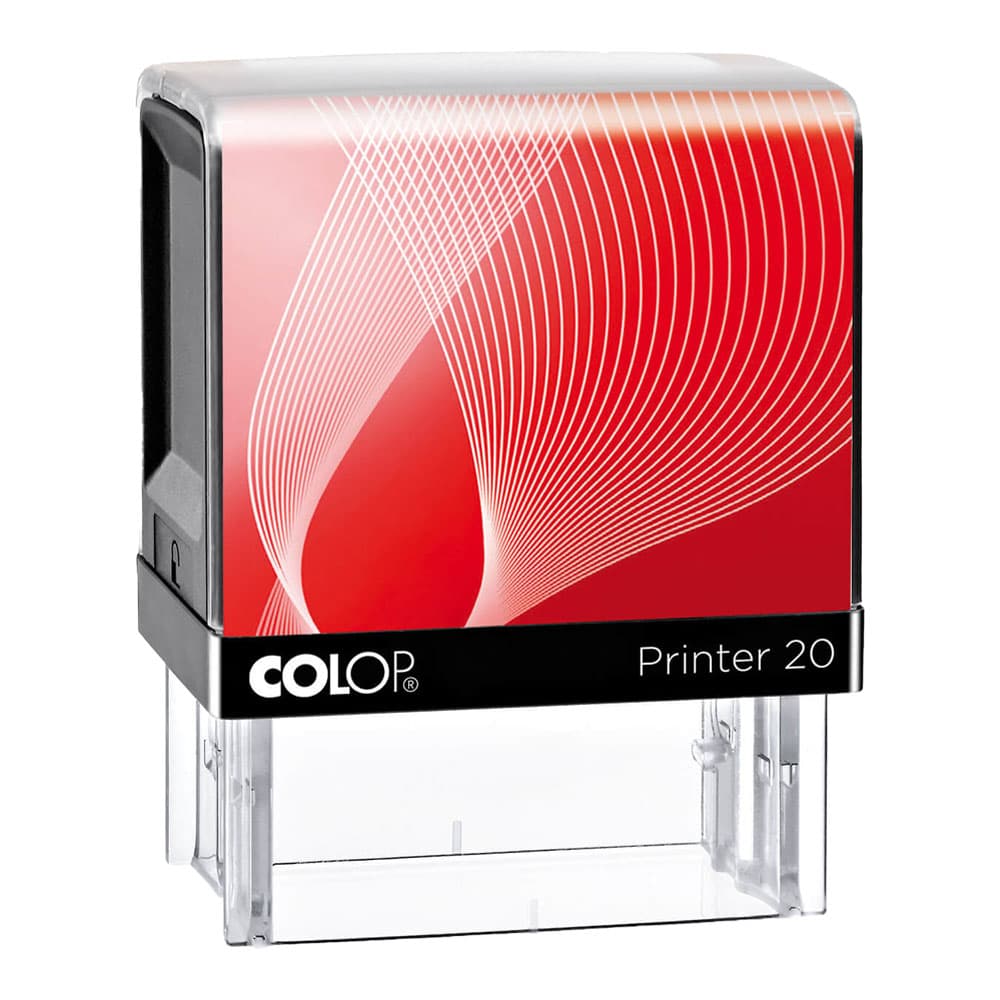
Self-inking stamp with your own text - Colop Printer
Configure to see your price
Choose your options and quantity. Your total will appear here.
Self-inking Colop Printer stamp with your own text or logo. Choose from ten sizes and four ink colours, design your stamp online and order from just one piece.
Product Configuration
Select all options
Selling yourself? Become a reseller
Your own stamp, without the hassle
A self-inking stamp is the quickest tool on any desk, counter or workbench. Put it down, press it and the impression is there: sharp, straight and identical every time. With this stamp the ink pad sits inside the housing, so you don't need a separate stamp pad and your fingers stay clean. After each impression the text plate flips back onto the ink pad by itself, ready to be re-inked for the next one.
We supply this stamp in the well-known Colop Printer housing, one of the most widely used self-inking stamps in offices across Europe. The housing is made of sturdy plastic, sits comfortably in your hand and has a window on the base so you can see exactly where your impression will land.
What do you use a text stamp for?
Most customers order a stamp for their address or company details. With an address stamp you add your sender details to an envelope, parcel, return slip or invoice in a second. But a stamp can do much more:
- Company stamp with company name, address, phone number, registration and VAT number
- Return or sender stamp for parcels and envelopes
- Admin stamps such as PAID, RECEIVED, POSTED or CHECKED
- Signature or initials stamp for documents you sign off often
- Logo stamp for kraft paper bags, packaging, labels and gift tags
- Loyalty card stamp for a hairdresser, coffee bar or shop
- School or reward stamp for the classroom
Ten sizes: which one suits you?
The size determines how much text fits legibly on your stamp. As a rule of thumb: the taller the impression, the more lines you can use. On a small stamp it is better to use a little text in a clear font than a lot of text in a font that is too small.
- 27 x 10 mm (Printer 10): a name or a short text on one or two lines.
- 38 x 14 mm (Printer 20): the classic address stamp. Name, street, postcode and town fit comfortably.
- 47 x 18 mm (Printer 30): a little roomier, for an address plus a phone number or email address.
- 59 x 23 mm (Printer 40): a complete company stamp with contact details and registration numbers.
- 69 x 30 mm (Printer 50): plenty of space, for example for a logo next to your company details.
- 76 x 37 mm (Printer 60): the largest rectangular size, for longer texts or form stamps.
- 30 x 20 mm (Printer 52): compact but relatively tall, handy for a small logo or block of text.
- 60 x 40 mm (Printer 55): a large, tall stamp area, for example for check boxes or a logo with text.
- 12 x 12 mm (Printer Q12): a mini stamp for initials or a small icon.
- 24 x 24 mm (Printer Q24): a square size for a logo, emblem or quality mark.
Torn between two sizes? Go for the larger one. A slightly roomier stamp leaves more white space and gives a calmer, easier-to-read impression.
Choosing the ink colour
You can choose black, blue, red or green. Black is the standard for admin and addresses. Blue is often chosen for signature and approval stamps, because a blue impression on a copy immediately stands out as the original. Red and green work well for status stamps such as PAID, REJECTED or APPROVED. The ink colour does not affect the price.
How to design your stamp
Once you have chosen the size and colour, you move on to the design. In our online editor you type your text, pick a font and line everything up neatly. The editor shows your design at the right size and in the chosen ink colour, so you can see in advance what the impression will look like. Have a logo? Add it as an SVG vector file. If you already have a finished design, upload it as a PDF, ideally with the text and logo as vectors.
A few tips for a great impression:
- A stamp prints in one colour. Photos, gradients and shadows do not come out well.
- Keep letters at least 2 mm tall where possible. Smaller text fills in more easily.
- Avoid extremely thin lines; at least about 0.2 mm gives a reliable result.
- Leave about 1 mm free along the edge of the stamp area.
- Double-check phone numbers, email addresses and house numbers. We make the stamp exactly as you supply it.
Quality and lifespan
The text plate is engraved with a laser. That keeps even small letters and logos sharp, and they stay sharp after thousands of impressions. The built-in ink pad lasts a long time. If the impression gets lighter over time, the ink pad can be replaced and your stamp remains perfectly usable. That way you can enjoy the same stamp for years.
Order from just 1 piece
You can order from a single stamp. If several colleagues or branches use the same details, simply order the number you need in one go. Want stamps with different texts, for example one per employee? Add them as separate lines to your basket. The stamp is shipped in neutral packaging, without advertising or price information, so you can also have it delivered as a gift or straight to a customer.
Technical specifications
Related products


Printing tips for this product
Aug 31, 2026
Order a Custom Tea Tube: A Fresh Idea for Your Brand
Discover how a custom tea tube can boost your brand. Choose from five cocktail tea flavors, print your design, and make a sustainable impression at events or as corporate gifts.
Read article
Oct 12, 2026
Premium Aprons: Custom Printing for Hospitality and Corporate Use
Discover how premium aprons made from 215 g/m² polycotton can elevate your brand. Choose from 17 colors and multiple printing options for a professional look.
Read article
Sep 7, 2026
Fruit of the Loom Original T-shirt: The Perfect Canvas for Your Prints
Discover the Fruit of the Loom Original T-shirt: 21 colors, 14 sizes, ideal for screen printing or transfer printing. Perfect for teams and workwear.
Read article
Newsletter
10% off your first order
Sign up for printing tips and inspiration. Your discount code will appear after you sign up.